Introduction
February 17, 2021
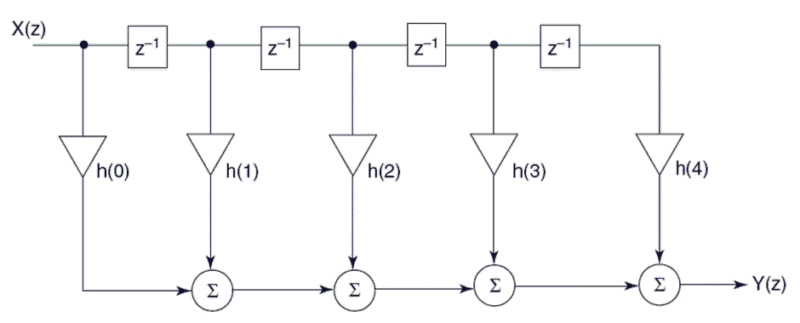
From late 2019 to late 2020, I was thinking about implementing a digital crossover. At first, I spent a lot of time looking into developing my own DSP-based hardware. The more I delved into the subject, the more I realized that none of the DSPs I was considering were powerful enough. The number of possible taps when using FIR filters is simply too low.
The deciding factor in choosing FIR filters was the 2006 article “Thoughts About Crossovers” by Dr. Ulrich Brüggemann (AudioVero), which uses a step function to illustrate the frequency response of analog filters (e.g., second-order Butterworth). In the investigations, only the crossover itself is considered, and the loudspeakers are assumed to be ideal — which, of course, they are not. The result is alarming: there is no longer any trace of a step function behind the filters! However, the second part of the article then describes the solution to the problem in the form of FIR filters.
My friend Heiner has long relied on a solution featuring an 8-channel A/D and D/A converter designed for studio use. The digital crossover and room acoustic adjustments are all run on a PC. With the right hardware performance, there are virtually no limits to what the “crossover” can do.
My initial plan was to use a converter with digital I/Os and a compatible sound card in the PC. After researching the topic for a while, I decided to use a Dante interface for the transmission. This requires only inexpensive standard network components. These components also allow for longer cable runs, so the PC could be moved from the listening room to the adjacent room. Since the converter supports a maximum of 16 input and 16 output channels, transmission up to 192kHz/24-bit is possible with this solution without any issues.
However, I would like to emphasize once again that I would not have gone to all this expense “just” for a simple crossover, even though the article above very convincingly describes the drawbacks of analog filters. Despite everything, the setup consisting of the AFW1 and SubDSP works extremely well for me. The whole setup really comes together when you use it to incorporate room acoustic correction filters as well. I’ve already seen just how effective such filters can be on my friend Heiner’s system.
On February 15, 2021, the AFW1 and the SubDSP were replaced by the digital setup!
Crossover Hardware
April 18, 2024
As I mentioned in the introduction, the crossover hardware consists of several components. In addition to the crossover components, it’s also a good idea to use an additional computer to manage the Dante network and access the Convolver PC via Remote Desktop. My setup consists of the following components:
- the Convolver PC for the convolution software
- the 8-channel A/D and D/A converter (later upgraded to 20/16)
- the administrative PC
- a switch
Convolver-PC
I had to buy a new computer for the convolver. I decided on a B460 Mini-ITX motherboard with an Intel i5 Socket 1200 processor and 16 GB of RAM. That’s more than enough power to compute even complex FIR filters with a large number of taps. Since the computer isn’t located in the listening room, it can be cooled using standard cooling methods.
Addendum:
In the meantime, I upgraded the computer’s hardware. I’m now using an Intel Core i7-13700K. My experience has shown me that the Convolver PC should be as powerful as possible.
A/D & D/A Converter
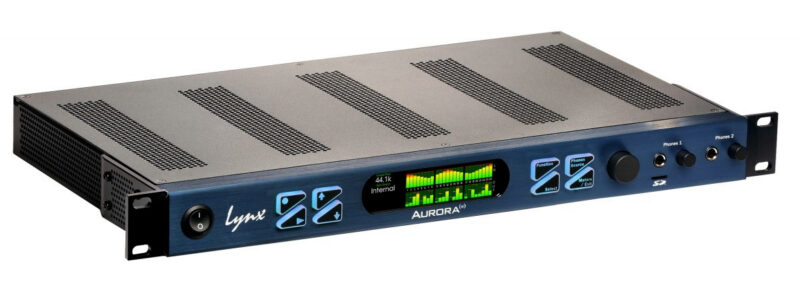
After receiving some very helpful advice from my friend Heiner and doing some research on my own, I decided to go with an eight-channel Lynx Aurora(n) 8 DANTE equipped with an LM-AIO8E converter card and an LT-DANTE interface card. It was no small investment, but as the central device in my audio setup, it was worth every penny. Lynx converters are extremely neutral in sound and therefore ideally suited for use in a high-end audio environment.
In August 2021, I upgraded the converter with an additional LM-AIO8E card and an LM-PRE4 microphone preamp card. The correct name for the converter is now Aurora(n) PRE 2016 DANTE. This allows me to perform all acoustic measurements using the Lynx.

Administrative PC
In my listening room, I have an embedded PC with no moving parts, which I use, among other things, to measure room acoustics. Thankfully, this PC comes equipped with two network interfaces. One of these interfaces connects to my internal PC network; the second, previously unused one, is connected to the “Audio Switch.” I use this PC to configure the Dante network. I could also install the Dante management software on the Convolver PC and access it via Remote Desktop, but I find this approach much more elegant, and it only costs me a single network cable.
Switch
In principle, the requirements for the switch are relatively modest. However, if you take a closer look at the specifications Dante imposes on this hardware, the task becomes a bit more complicated than it initially seems. In particular, the requirement for a switch that does NOT operate in EEE mode (Energy Efficient Ethernet or “Green Ethernet”) makes finding a suitable device difficult these days. All the inexpensive unmanaged devices available have this mode implemented, and of course, it cannot be disabled on these devices. This leaves you with no choice but to opt for a managed switch. EEE is implemented here as well, but unlike the simpler devices, this mode can usually be disabled. Unfortunately, there isn’t really any useful support from Audinate, so you have to go out and find a suitable switch yourself. The Ethernet cabling should be done entirely with CAT5e or CAT6 cable; I decided to go with CAT6.
Contrary to Audinate’s recommendations, I decided to use a simple, unmanaged switch — for now. Since I’m only transmitting a few audio channels (2+5) at 96 kHz/24-bit, I haven’t encountered any issues with this switch so far.
Addendum:
In the end, I decided to go with a managed switch after all, and I’m now using a Cisco SG250-08. Audinate has a presentation that, among other things, explains the optimal configuration for a managed switch using a Cisco device as an example. I was able to follow those instructions and now have a switch optimized for the Dante network in use.
Crossover Software
March 3, 2021
The Convolver PC runs Windows Server 2022 as its operating system, but unfortunately not in Core Mode. This is because AcourateConvolver does not function properly in Core Mode. The PC has neither a keyboard nor a monitor. The system can be accessed via Remote Desktop, for example from the administration PC.
The AcourateConvolver software from AudioVero is used on the Convolver PC for the actual convolution process. Acourate — also from AudioVero — plays a key role here. This software runs on my administrative PC and is used to calculate FIR filters, crossovers, and to measure the listening room. Once this data has been determined, correction filters for the room acoustics can be generated using it. This data is then transferred to the Convolver PC. The audio data can now be convolved with this data in “real time” using the Convolver and distributed to the corresponding D/A channels of the converter. Of course, there is some latency involved, which increases the more complex the individual filters are. However, we’re talking about an audio playback system here, so it doesn’t matter if the music takes a few milliseconds longer to play.
However, a driver is still needed to transfer audio data from the Ethernet interface to the Convolver software. This driver is provided by Audinate — the company behind the Dante network. The Dante Virtual Soundcard (DVS) connects the network interface to the audio application via an ASIO driver.
The Dante Controller is running on the administration PC. This is the management software for the Dante network and is also provided by Audinate. Unlike the DVS, however, this software is free of charge. The Lynx NControl software is also running on this PC. Using the drivers installed by the Dante Controller software, NControl can access the converter via the Dante network.
You can read here how to configure and optimize such a system.
Audiophile Review
February 25, 2021
Thanks to the Stacked Quads and Pass’s circuit design, my system offers very high resolution. My concern was that this might be compromised by the additional A/D and D/A conversion. After a week of intensive listening, my fears proved to be unfounded. Even with the digital crossover, the system retains its original character. This speaks to the quality of the Lynx. However, as with any other audio electronics, this converter also requires a break-in period. I can describe my first impression of the selected target curve in one word: balance.
That might sound like very little, but that’s not what I mean at all. The difference is actually quite noticeable. What I’m trying to say is that I now have a very even reproduction of all frequency ranges. The tonal balance between the mids and the highs is significantly better than before. The bass has also improved noticeably and blends very nicely into the overall sound. The reverberation time is already quite decent even without the active absorber, but it could be even better — this is the next step in the optimization process. So I can already say with certainty today that the radical shift toward digital signal processing has been worth it.
March 2021 / Addendum:
The Lynx converter has now settled in and is performing at the high level I had hoped for. The active absorber has also been calibrated and is up and running since the day before yesterday. Naturally, this has altered the room’s acoustic properties, so the convolution files had to be recalculated. The objective function has not been changed. The result is overwhelming! I would never have thought it possible that such precise reproduction could even be achieved in my room.